
4 users writing portable interactive drawing smart board whiteboard
Do you have an interactive whiteboard in your classroom? If you are an American teacher, chances are one in five that you do. For British classroom teachers, it’s seven in ten. Interactive whiteboards have been called engaging, even revolutionary. And if you don’t have one now, it’s likely you will soon. Over half a million were sold last year alone.
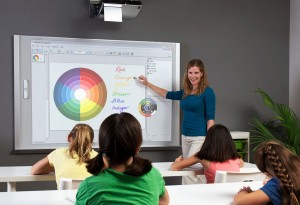
4 users writing portable interactive drawing smart board whiteboard
But what does that mean for your classroom instruction? Will it really change the way your students learn?
“It’s not just about the technology—it’s about learning how to use the technology in an effective and meaningful way,” says Cathleen A. Norris, professor of learning technologies at the University of North Texas. Interactive whiteboards certainly aren’t a one-stop solution for raising achievement in your classroom. But under the right conditions, they can help promote student engagement and foster content area learning in a constructivist, learner-centered classroom.
How Whiteboards Work
Over the past decade, interactive whiteboards (IWBs) have become increasingly commonplace, but even teachers who have them may not fully understand how they work. Essentially, interactive whiteboards are large, touch-sensitive displays that connect to a computer and a projector. This allows users to combine the features of traditional whiteboards, flip charts, TV/DVD players, and LCD projectors into one piece of technology.
In addition to the boards themselves, there are a number of accessories that can be used in the classroom. Wireless slates allow teachers to move freely about the room while having access to the board, for instance. And classroom response systems function as handheld clickers that can allow for instant assessment. Basic clickers offer options for polls and multiple-choice answers, and more advanced clickers allow students to respond with text and numbers.
“I use the clickers to get instant feedback on my students’ understanding of a concept,” says Melissa Gosche, a third-grade teacher in Schiller Park, Illinois. “The kids enjoy the game aspect, and it helps get a quick sense of which students need additional review.”
Four fingers writing at the same time Video
Multi writing : http://youtu.be/WpJvJPjIXWc
Software demo : http://youtu.be/TkcgpwEV8Kk
Destructive testing : http://youtu.be/bjYoPrF_EhA
Kindly check the detail whiteboard information as below
1) IR technology, Four students writing at the same time, smooth writing, high precision a 3mm diameter stick or pen can write on our boards, full education contents software, full language options and so on. Picture for your reference. Pls be noted that projector and the mobile stand are not included in the standard package.

The benefits of Tacteasy Infrared Interactive whiteboard:
1) Meetings project your presentations onto TACTEASY board right from your PC. Use the pens or fingers to control your PC application right from the board itself.
2) Presentations no just present to your participants, also interact with them. Simply use the pen or finger to emphasize and highlight key words and substance. Incorporate comments and feedback. Save and distribute the collaborated presentation to all attendees.
3) Seminars using the TACTEASY interactive whiteboard and pen or finger, adding notes to your presentation has never been easier. Stand in front of your board and have complete control over your PC and its applications.
The advantage of Tacteasy Infrared Interactive Whiteboard:
ð Four Users write at the same time, infrared sensor technology, with finger touch directly for operation;
ð Strong anti- resistance to light, work directly under sunlight;
ð Multi-touch, intelligent gesture-recognition like: Start software by palm, turn page by hand-waving, moving writing on page by fingers, fist work as eraser;
ð Module design, simple combination, installation and parts exchange after sale actively.
ð The material is exquisite; Adopt the aluminum honeycomb as the basal plate, flatter and more reliable.
ð USB works as direct power supply, update and data transfer;
Speification of interactive whitebaord
| Material of Board | Aluminum Honeycomb | Working humidity | 20%-90% |
| Induction Type | Infrared | Storage humidity | 10%-95% |
| Writing Type | finger or pen | Working temperature | -10°C~40°C |
| Positioning Accuracy | < 0.2mm | Storage temperature | -40°C~50°C |
| Touch Preciseness | 8192*8192 | Warranty | 3 years |
| Cursor Speed | >125dots/second | Hardware Features | |
| Transferring Rate | 12m/s | Device driver version | DL-USB |
| Scanning Rate | first point 25ms consecutive points 8ms |
Scanning form | Auto start, always scanning |
| Consumption Current | <100mA | Version | Latest available |
| Working Environment | Direct under the sunlight | Data Port | USB /wireless RF2.4G/RS232 |
| Dimensions | |||
| Model(touch size) | Scale | Outline Area (mm) | Touch Area (mm) |
| TE-88inch | 4:3 | 1779×1366 | 1640×1230 |
| TE-96inch | 4:3 | 1940×1530 | 1804×1394 |
Warranty time:
The interactive whiteboard with 3 years warranty time whilst all PCB for interactive whiteboard come with advanced replacement warranty as standard for 3 years, which means if there is a problem and we can’t fix it you’ll get a replacement straight away

10 points and 4 users smart board whiteboard
While starting out with a new whiteboard will require creating new lessons, the software allows you to easily save projects or lessons for reuse or to share with other teachers. Some models even allow you to record your entire lesson as a digital video. “At our school, every class has its own website, so it’s easy for teachers to post units and resources online,” says Tom De Craene, director of technology for Cranbrook Schools in Bloomfield Hills, Michigan. “Students can easily review in-class material and teachers can share lessons and collaborate.”
The Effect on the Classroom
Jamie Stoeckly is a fifth-grade teacher in Sparta, Wisconsin. He has had the same group of students for two years, but this is his first year using an interactive whiteboard. “The response from my students has been incredible—with our whiteboard, the kids are engaged, they’re on task the entire time, they want to participate in class more,” he says. During a recent geometry lesson, the interactive whiteboard allowed them to gain hands-on understanding of the material. “They were able to draw and then manipulate shapes right on the board,” Stoeckly explains. “It’s a whole other level of excitement.”
Almost across the board, teachers report that their students are highly engaged in activities with interactive whiteboards. The question is, why?
First, they appeal to kids’ multiple intelligences, providing opportunities for visual-spatial and bodily-kinesthetic learners that can be hard to accommodate in the print-based classroom.
Second, interactive whiteboards allow you to reach your students through a variety of mediums. For example, if you are studying Kenya, your students might use Google Earth to project the country on the whiteboard, zooming in and out to see the terrain, and clicking on photos that show details, daily life, flora, and fauna. They can take a virtual safari to Lake Nakuru National Park, courtesy of National Geographic. Then, when students dive into the reading, they have a variety of background knowledge and increased motivation. Given the chance, many students will readily accept the invitation to engage with interactive whiteboards—which creates a space for new and exciting learning to take place.
Increase Differentiation
Interactive whiteboards can be a helpful tool for differentiating learning, especially for students who may struggle in a more traditional classroom. “Our research found that when teachers used an interactive whiteboard, it helped students to attend to stimuli,” says Philip Nordness, a professor of special education at the University of Nebraska–Omaha. “It’s large, easy to see, and interactive. For students who struggle with vision issues or fine motor skills, the interactive whiteboard allows them to more fully engage with the lesson.”
In his research in an early childhood special education classroom, he found that students with an interactive whiteboard were on task 81 percent of the time—compared to 58 percent for students in a regular classroom. Nordness also points out that students with disabilities often get less time with technology compared to their non-disabled peers. “If they’re pulled out of the classroom for individual instruction, it often happens during the time when other kids are on the computer,” he says.
“The beauty of interactive whiteboards is that they appeal to both higher -level learners and lower-level learners,” maintains Deborah Rudenko, a special education teacher in the South Side Area School District in Hookstown, Pennsylvania, and a certified SMART whiteboard trainer. “For what you can do with them, they are really the best educational and economical value.”
Transforming Instruction
In his experience at Cranbrook schools over the past decade, De Craene has found that some teachers elect to be early adopters, and others need more time to acclimate. “It takes three to five years before most teachers fully integrate whiteboards into their teaching.”
For that reason, De Craene is adamant that whiteboards need to be installed in individual classrooms rather than in shared computer rooms to allow for daily, consistent use. Craig Steszewski, a fourth- and fifth-grade teacher in Thomasville, North Carolina, heartily agrees. “Using an interactive whiteboard has changed how I teach,” he says. “I structure and deliver my lessons differently, and I can readily access the Internet, graphic organizers, and do assessment. I really can’t imagine teaching without it now.”
Time and space to experiment and collaborate is crucial to making a whiteboard a valuable tool in your classroom. Your school can help by having an openly accessible server for teachers to post and share lessons, as well as by hosting dynamic training sessions. But in a digital world, you can also look for whiteboard support outside of school walls. Thousands of teachers worldwide use the resources, tools, and community knowledge available at the Promethean Planet and SMART Exchange websites. Still, there is no question that getting up to speed can be a challenge. “In some ways, introducing an interactive whiteboard into your classroom can feel like your first year of teaching all over again,” explains Kim Trendel, a middle school cross-categorical teacher in Franklin, Wisconsin. “But remember that your fellow teachers are excellent resources, and they’re all around you.”
Good teaching will still be good teaching, with or without technology. But new and veteran teachers alike will have the opportunity to introduce a highly interactive and visual medium to their students—a medium that has the power to transform learning. “In the end, we need to remember that this is a tool—and how we teach is just as important as what we teach,” says Illinois teacher Melissa Gosche. “This kind of technology is not replacing the teacher in the classroom—instead, it is just a way to enhance your teaching even more.”
This entry was posted on Friday, July 25th, 2014 at 08:41 and is filed under iwb. You can follow any responses to this entry through the RSS 2.0 feed. You can leave a response, or trackback from your own site.